

Random generator spreadsheets
So, my other favorite TTRPG tool is Google Sheets. Spreadsheets in general, really, but the convenience of Google Sheets (and Google Drive, etc.) has me pretty solidly hooked into that ecosystem. Anyway, I'm a huge fan of generating RPG stuff by rolling on loads of tables—I really oughta do a whole post about Jennell Jaquays' Central Casting books, someday—and you can make that process a hell of a lot faster and more flexible by building your tables in a spreadsheet and using random number formulas to roll the results for you.
So, here's an example.
Osluth demon description generator
The irrelevant backstory here is that I was running a dungeon that had Orcus cultists accompanied by these demon goats, and in addition to recasting Orcus as a death god named Osluth, I decided the demon goats needed more varied and fucked up appearances.
Anway, I'd like to explain how this whole thing works, and it will hopefully be useful to the narrow sliver of humanity who wants to make random generators, and has some knowledge of how spreadsheets work, but doesn't already know how to do all of this stuff. And who actually encounters this post somehow.
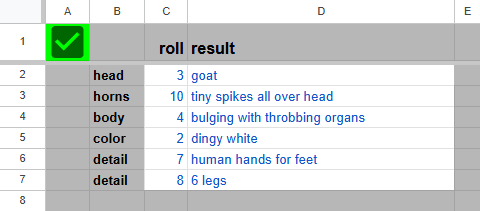
The box on the left contains the actual generated description of the beast, while the rest of the spreadsheet comprises tables of possible results. The blue values are generated by formulas, while the black text is all static values. If you reload the spreadsheet, all of the random number formulas will reload, produce different numbers, and effectively roll up a new description. Reloading is kind of slow, though. It's better to just copy the sheet for yourself (File > Make a Copy) and click that green checkbox in the corner. The checkbox doesn't really do anything-it's just a TRUE/FALSE field that's not connected to anything else on the sheet-but all of the randomizers trigger every time something changes, so it functions as a handy reroll button.
Here's how it works. Each of the subtables in the sheet has three columns of numbers: chance, min roll, and max roll. "Min roll" and "max roll" are just the range of numbers that produce a given result, just like on a regular dice table. "Chance" is what determines how big that range is. The first min roll value in a table is always 1, so there's no formula generating that. Each max roll value is (min roll + chance) - 1, making the total range for a given result is equal to the chance value. Min roll values after the first are always just the previous line's max roll + 1.
So that first subtable—the one that generates the demon's head—is just a 1d17 dice table. It's four times as likely to produce a goat head as an ox head, because the "goat" result comes up on a roll of 1–4, while "ox" only comes up on a roll of 7.
Here's how we get the spreadsheet to roll a d17. The "roll" column of the description generator is produced by formulas like this: RANDBETWEEN(1, SUM(F:F)). That SUM(F:F) part just adds up the contents of column F. That's the "chance" column of the head subtable, and it sums up to 17, which is of course the same value as the maximum roll on that subtable. RANDBETWEEN(1, SUM(F:F)) generates a random number between 1 and the sum of column F, so it's effectively rolling 1d17. Each cell in the roll column looks at the chance column of a different subtable, and generates a number between 1 and that subtable's maximum roll.
The "result" column interprets the rolls using formulas like this: VLOOKUP(C2, G:I, 3, TRUE). What this means is that it takes the value in cell C2 (the "head" roll), and looks it up on the table in columns G though I (meaning "min roll", "max roll", and "head" in the head table), and returns the matching result in the 3rd column of that range (the "head" column). The TRUE at the end there tells the formula to do an "approximate match", meaning that it will treat the column G values as minimum thresholds to match: A roll of 10 will match the value 8, and produce a result of "boar". If that TRUE argument was instead set to FALSE, the formula would be in "exact match" mode, and a result of 10 wouldn't match anything. (Note that the VLOOKUP formula doesn't actually look at the max roll column at all; it's just the min roll one that matters. I only create those max roll columns because I like to see the actual range.)
You might notice one slightly odd entry at the right side of the sheet: The 8 result on the "detail" subtable has its own little random generator inside it, using this formula: MIN(RANDBETWEEN(5, 9), RANDBETWEEN(5, 9))&" legs". So we've got two RANDBETWEEN functions, each one generating a result between 5 and 9. The MIN function looks at the two results and picks the smaller one. The &" legs" at the end there just appends " legs" to the resulting number. So the goat demon that gets this result has between five and nine legs, with smaller numbers being more common than large ones.
I could get into more advanced stuff here, but that would call for a whole new custom example spreadsheet, and this post is already too long. Anyway, I hope it's actually useful for somebody!
